

Description
Philips CD100 – Compact Disc Player
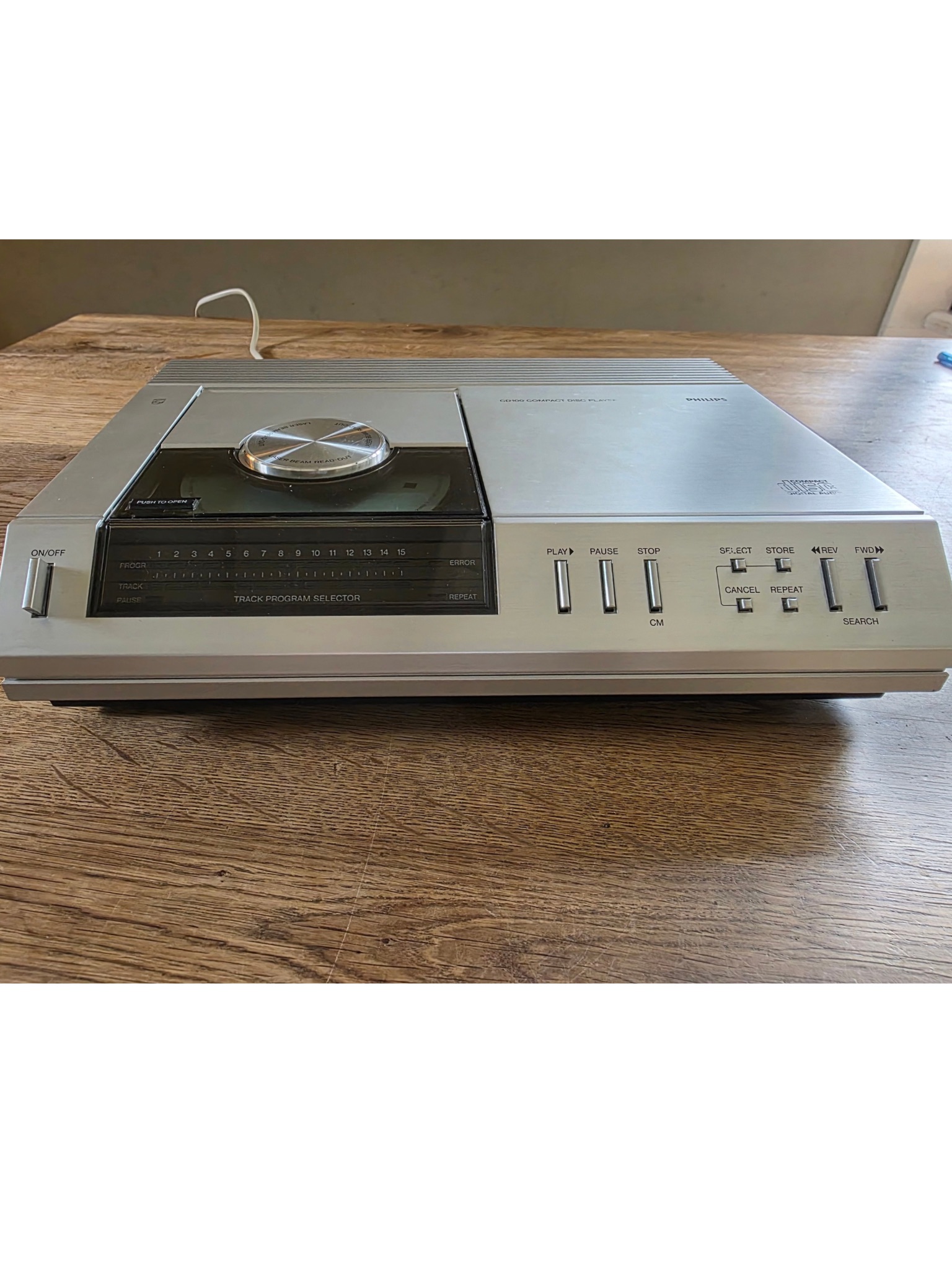
This is the simplest CD player in a range which Philips plan to introduce, and indeed they claim that it is the smallest on the market (being identical, except for external finish, to the Marantz CD-63). It is a top-loader and therefore not entirely suited to stacking in a rack or minisystem—unless it can be located at the top. The disc compartment lid is mechanically latched but will operate the stop mechanism if pressed to open during play. Inserting and removing the disc is easy, if not quite so simple as on the glidingdrawer front-loading types.
The sloping front panel carries basic, but well laid-out, controls and a sensible display scheme. The latter consists of green bar-lights (1 to 15) to show the number of tracks on the disc (or in the selected programme) with a second row of lights to indicate the track being played. The mains on/ off button is to the left of the display panel and on the right are buttons for play/next track, pause and stop/clear memory. Then follow four small buttons for the programming and repeat functions. Each track to be stored (up to 15) must be selected by pressing the `select’ button the requisite number of times (or holding it down while it hops through the numbers sequentially) followed by the ‘store’ button to enter it in the memory.
This can take a fair amount of time, depending on the sequence desired, but works smoothly enough—and at least the track selection is sequential and so, if track 12 is to follow 11, for example, a single tap on the select button will move the ‘select’ function to 11 As well as building up a programme sequence by this ‘add-in’ procedure, it is possible—and preferable where most of the tracks are to be included in their normal order—to adopt a ‘take out’ procedure using the ‘store’ and ‘cancel’ buttons together. The ‘repeat’ button is self-explanatory in that it will cause the machine to repeat the whole disc or the sequence already programmed. However, repeating a single track can be initiated by selecting the track number and pressing ‘play’ once again.
Cue searching involves use of the rewind and fast forward buttons but, since there is no sound during searching, trial and error is necessary. Naturally the process can be speeded up if the desired track is first located by normal means, and searching carried out from there. The pause function interrupts play, though the disc keeps spinning, and restart from the same spot can be triggered by pressing either the pause or start button.
CD decoding
The signal picked up by the photodetector is a frame struc-tured data stream containing a great deal of information in EFM (eight-to-fourteen modulation) format. The first stage of decod-ing is to establish clocking (timing), and to retrieve the 8-bit format from the EFM format. For this purpose, the syn-chronisation pattern is separated from the control and display symbol and the (audio) data symbols. Clocking will eliminate small timing errors (jitter) in the data stream, caused e.g. by disc speed variations. The second stage of decoding is application of error correction and interpolation to the data symbols.
In the third stage, left and right channel data words are demultiplexed (split apart) and separately converted back to analogue for to provide normal-style stereo pre-amplifier input signals. Meanwhile, the derived clocking signal is compared with a quartz crystal controlled oscil-lator reference frequency. Any discrepancy generates an imme-diate correction signal for the disc motor speed servo system. This servo system, together with the abovementioned clocking operation of the data stream, is making wow and flutter com-pletely inaudible.